How to Configure Router/Switch/PC on Cisco
How to Subnet
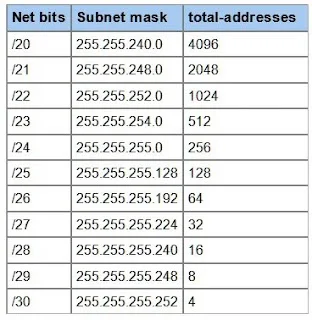
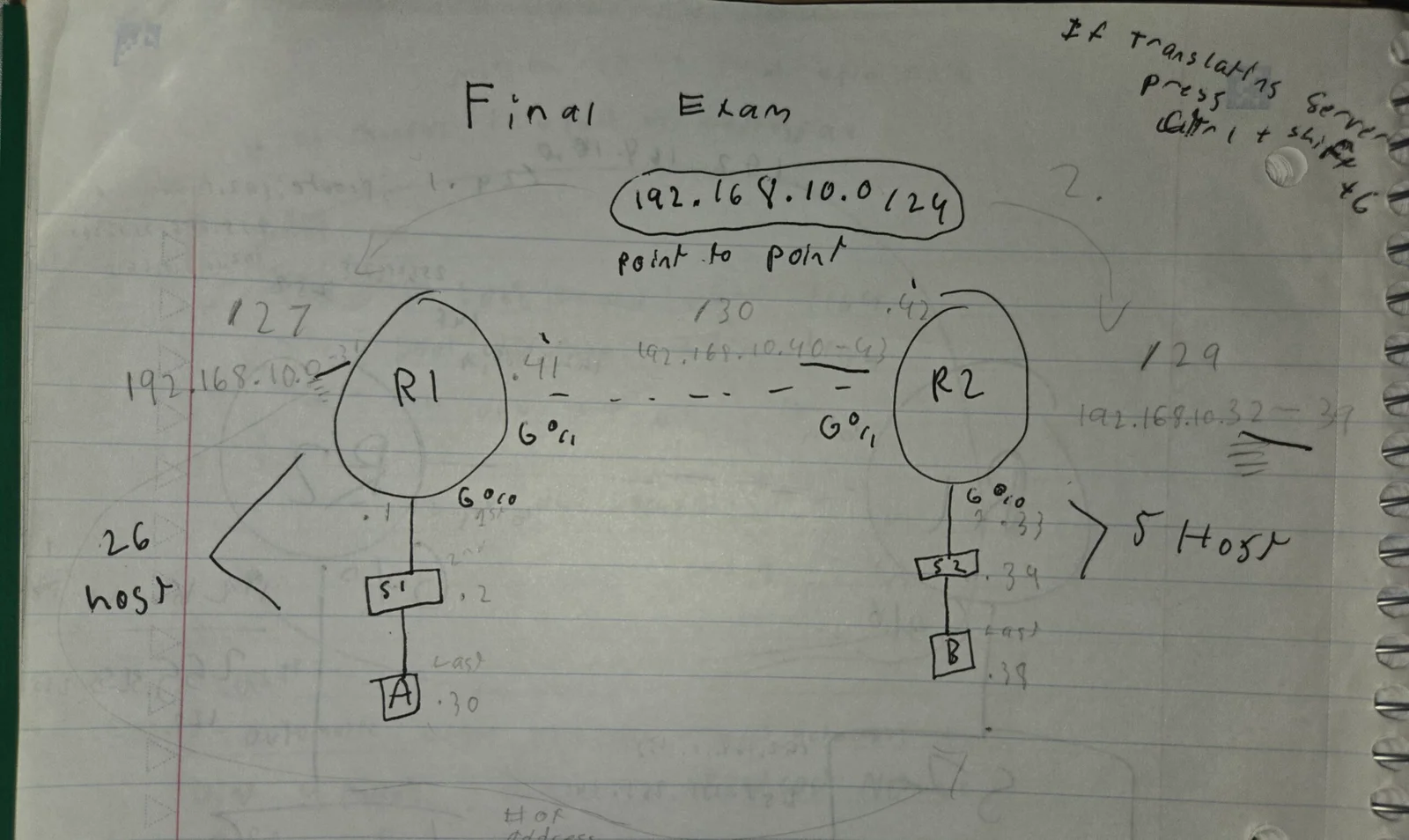
Look at how many network are available from router to the pc. And do the largest network available first. Look at how many subnet mask we have which is /24 R1 is 26 host, R2 is 5 host. Do left. LOOK AT THE SUBNET MASK CHART and see how many addresses we can use on each subnet. (ex. 26 host is available, /27 has 32 address so we will use that. Subtract 2 and in reality we have 30 address to plug into our system. Why? Because we need the last digit (32) for the Second Network.
First is R1 (192.168.10.1 255.255.255.224) Second S1 (192.168.10.2 255.255.255.224) Third is PC1 (192.168.10.30 255.255.255.224)
Right side is 5 host. /29 have 8 network available so we will use that. We have 6 available to plug into our second nertwork. The First digit is (32) (192.168.10.32-39)
R2 (192.168.10.33 255.255.255.248) S2 (192.168.10.34 255.255.255.248) PC2 (192.168.10.38 255.255.255.248)
FOR POINT-TO-POINT
We need to route 2 ROUTER only so 2 address is needed for our system. /30 has 4 address available. (192.168.10.40-43)
R1 (192.168.10.41 255.255.255.252) R2 (192.168.10.42 255.255.255.252) thats it
Configure Router 1
R1 -> en -> conf t -> hostname R1 -> int g0/0 (whatever u plugged in the ethernet cable) -> ip address 192.168.10.1 255.255.255.x (whatever the subnet mask is with the slash (ex. /27) -> no shut
IF CONFIGURING POINT-TO-POINT -> ip address 192.168.10.x 255.255.255.x -> no shut -> (when done w/ everything) ip route 192.168.10.x 255.255.255.x 192.168.10.x (default gateway)
How to Configure Switches Cisco
S1 -> en -> conf t -> int vlan 1 ->ip address 192.168.10.x 255.255.255.x -> no shut -> exit -> ip default-gateway 192.168.10.x (normally 1) ->exit
Extra Important Cmds
For Private Password: enable password x
For Encrypt Password: service password-encryption
Console Pwd: lin con 0 -> enable password x
Banner of the day: banner motd # x d#
Display a summary of all IP interfaces on a network device, like a router or switch) - do show ip int brief
Vlan
Show VLAN Name & Ports Assigned: show vlan brief (in privileged exec mode)
Change VLAN Name -> vlan ? (? = number) ex. vlan 3
Add IP in VLAN – interface vlan ? - ip address x.x.x.x (ip) x.x.x.x (subnet)
To Assigned Port to a Specific VLAN: interface range f?/? - ?, (ex. interface range f0/2 – 17, f0/19 – 24, g0/1 – 2) -> switchport mode access -> switchport access vlan ? -> shutdown
Manually configure trunk interface F0/1. -> interface f?/? -> switchport mode trunk
Set the native VLAN to 1000 on both switches by trunk -> switchport trunk native vlan ?
To allow port of trunk –> switchport trunk allowed vlan ?
IP Addressing
Show All Ports IP Assigned: sh ip in br (in privileged exec mode))
Erase Config
erase startup-config “press enter” -> reload
Encapsulation Dot1Q

If your configuring a dot number on a port you need to configuring it using “encapsulation dot1q ? (number)”
For Example G0/0/01.3 -> interface G0/0/1.3 -> description ? ? (name of VLAN) -> ip address 192.168.3.1 255.255.255.0
Subnet Mask Chart
/24 – 255.255.255.0 – 256 (# of address)
/25 255.255.255.128 – 128
/26 .192 – 64 | /27 .224 – 32 | /28 .240 – 16 | /29 .248 – 8 | /30 .252 – 4
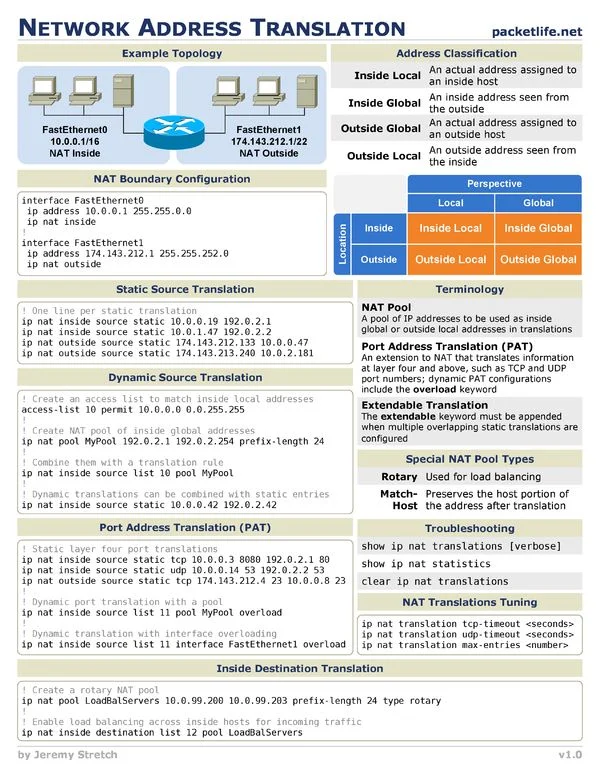
NAT CHEAT SHEET